Is the myFirst Fone R2 the Smartwatch Parents Have Been Waiting For

We reviewed the myFirst Fone R2 to see if it truly supports freedom and safety for kids. Here’s what families need to know before buying.
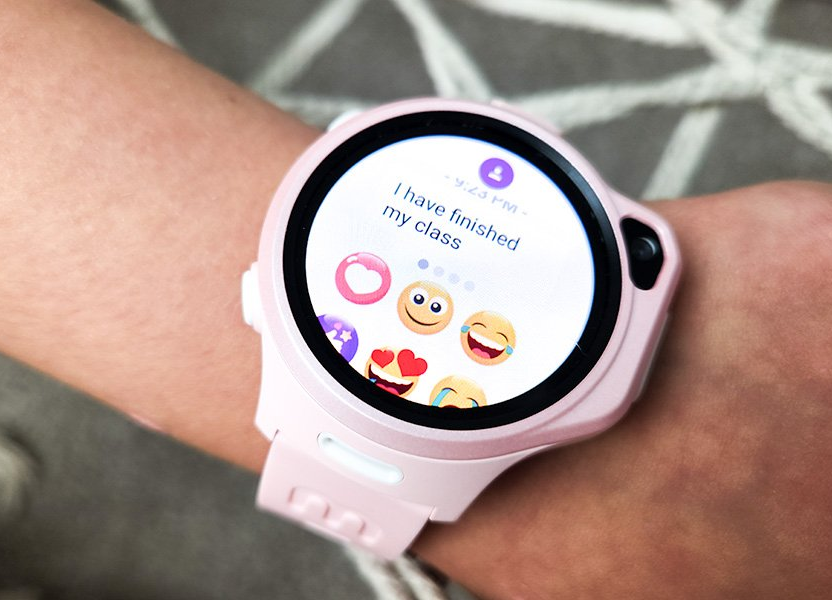
In a world where connection is almost expected, finding a middle ground between safety and independence for kids is now a conversation many families are having. The myFirst Fone R2 by myfirst tech enters, presenting itself as a smartwatch designed for children who want to stay in touch and parents who want to stay in control.
It’s not always clear what truly defines a good smartwatch for kids. Is it GPS? Video calling? Style? The Fone R2 checks off most of these features, but what does that really mean when it lands on a child’s wrist? This is where we dig in.
What the Fone R2 Offers
Calling it a smartwatch is just the start. The myfirst smartwatch blends essential tools into a small, lightweight frame. Inside are features you’d usually see across different devices, location tracking, two-way video calls, fitness functions, and parental controls, pulled together to create a single gadget that doesn't overwhelm.
With a 1.3” AMOLED screen, the visuals are bright and clear, and the design looks sleek enough to pass as a regular watch. myfirst tech clearly worked to reduce the bulk here, and it shows. The band fits comfortably on smaller wrists, which can be rare with tech built for adults and then repurposed for kids.
Location Matters More Than Ever
The one feature most parents tend to check first is GPS. The Fone R2 keeps it active, offering real-time location updates through the myFirst Circle app. This lets parents view location history and see exactly where the watch is at any given time.
Safe zones can be created in the app as geofences around schools, homes, or relatives’ houses. If the watch leaves a zone, an alert pops up. No digging into complex menus, no need to constantly refresh. It simplifies one of the most stressful parts of parenting today: not knowing where your child is.
Calls, Messages, and a Bit of Fun
One-touch calling and video chats add another layer of connection, particularly helpful during pickups, school drop-offs, or playdates. But these aren’t open lines. Contacts are added and approved by the parent account first, which limits outside access.
Kids can send messages, voice notes, and even Momoji, animated responses unique to the myfirst ecosystem. There’s also a knock-knock feature that lets parents request an instant photo snap, which creates an easy check-in without needing a call. These smaller features build a sense of security, while giving kids a fun, lighthearted way to reach out.
While some may expect more from the messaging tools, keeping it simple works better in this case. It keeps distractions low while still offering enough to feel modern.
Setting It Up and Managing It Day-to-Day
Setup starts with connecting the watch to Wi-Fi, installing the companion app, and scanning the QR code built into the watch display. It runs on myfirst eSIM, which means it doesn't need a physical SIM card and uses data plans that work across Verizon, T-Mobile, and AT&T networks in the US, Canada, and Mexico.
You’ll need to pick a plan to activate the device, and one month is free upfront. Subscriptions are managed through the app, with no hidden terms or lock-ins. The simplicity of that structure removes guesswork for those already juggling enough.
Through the app, adults control not just contacts but also access to features like texting, camera usage, and class mode, an option that blocks distractions during school hours. You don’t have to dive into deep settings; things are toggled on and off with clear labels.
This integration with the myfirst store ecosystem keeps everything linked without requiring outside apps. It’s focused and practical.
Display, Build, and Wearability
The AMOLED screen sits under tough Gorilla Glass, giving it a good level of durability. There’s also a built-in ambient light sensor that adjusts brightness depending on where the child is, which helps save battery and makes it easier to see in daylight or dim indoor areas.

Weighing in under 50 grams, it’s lighter than many kids' smartwatches. The strap fits wrist sizes from 85 to 145mm and can be swapped out with different colored bands available separately. Custom watch faces, wallpapers, and themes allow for some personalization, which gives the device a bit more charm and keeps it from looking overly functional.
It’s these smaller touches that help the Fone R2 feel more wearable and less like a tracker.
Limitations to Consider
No tech product lands without caveats. The Fone R2 requires a data subscription, and while it’s affordable, it’s still another monthly expense. Coverage depends on local signal strength, so testing it in your area early on is a good idea.
Battery life is decent for daily use, though heavy video calling will drain it faster. Some may find the 605mAh battery needs a top-up before the day ends, especially when using video and GPS actively.
There’s also the matter of availability. The Fone R2 is currently compatible only with the myfirst eSIM, which means using it internationally could be limited. Always confirm coverage through the MyFirst store before traveling or switching regions. And while this isn’t a full smartphone replacement, that’s arguably the point. It’s a controlled device with a narrow focus and that’s part of its design, not a flaw.
What Makes It Worth a Look
Families interested in giving younger children a taste of tech without the overload of apps, ads, or open calls might find the Fone R2 delivers just enough. It’s structured, purpose-built, and keeps the family connected in a controlled way.
Those looking for discounts might want to watch out for seasonal offers or check if a myfirst promo code is live during checkout. It’s often listed directly on their site or through affiliate platforms, and can ease the initial cost.
The myFirst Fone R2 creates space for kids to grow into independence while keeping them within sight and reach. It doesn’t aim to replace smartphones or compete with high-end wearables. Instead, it creates its own category, a safety-driven, kid-focused, communication tool that doesn’t pretend to be anything else. For parents deciding if their child is ready for connected tech, this watch opens a door without swinging it wide.
As the premier partner of the myFirst affiliate program, we would like to inform you that by tapping on the referral link, you may save big on your next purchase. We may earn a small commission without extra cost to you.
Follow ChuckleCraft for more grounded reviews and insights into the latest gear and travel tech for families on the go.
Recent Blogs
-
AWOL Vision Projector Review: Is It the Right Choice for Your Home Theater?
-
Smooth Finish Coffee Review: Is This the Perfect Morning Brew?
-
SkinSpan™ System Review: A New Approach to Anti-Aging Skincare
-
Realistic Lightsabers Superneox Fans Keep Coming Back To
-
Top Abbode Home Décor Picks for Stylish Living